Skip to content
The Lazy Administrator
  • Home
  • Disclaimer
  • Contact
  • About Me
  • Search Icon

The Lazy Administrator

Finding ways to do the most work with the least effort possible

Post Users with Expiring Passwords as Microsoft Teams Message with PowerShell

Post Users with Expiring Passwords as Microsoft Teams Message with PowerShell

December 7, 2018 Brad Wyatt Comments 9 comments

Microsoft Teams has many connectors available including Incoming Webhook. “This provides an easy solution to post notifications / messages from any scripting language through JSON formatted web service call.”1

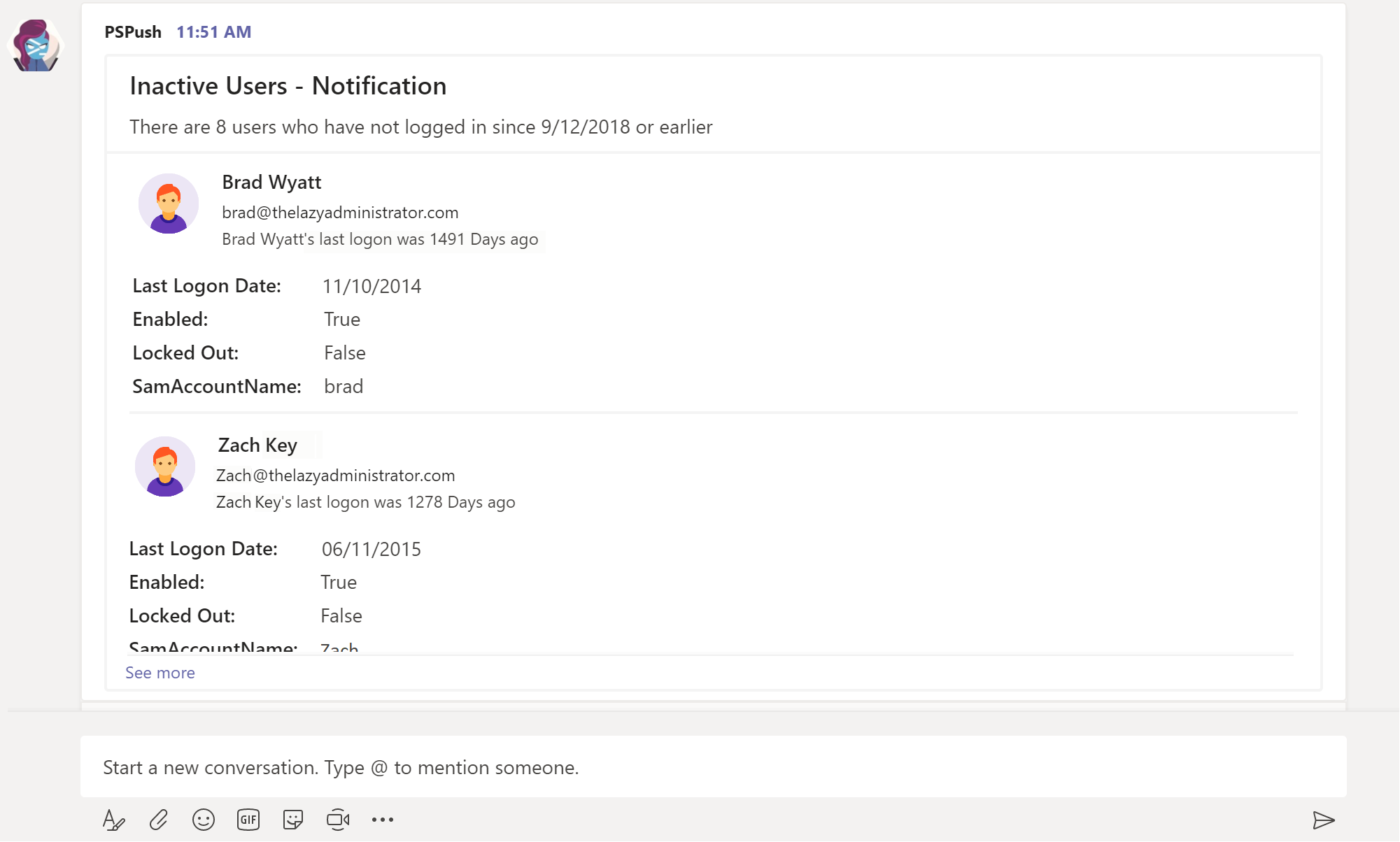
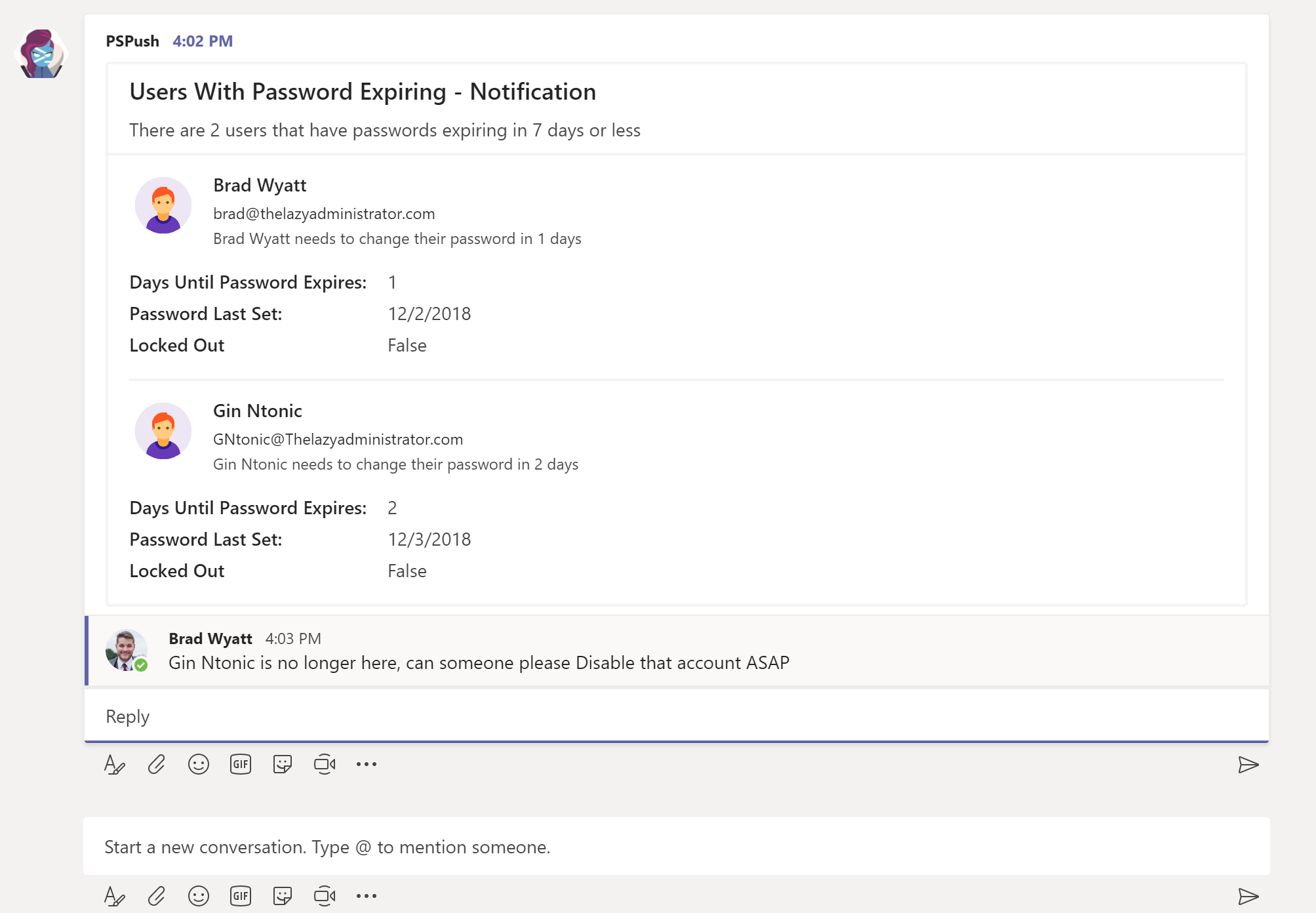
In this post I will show you how you can gather all of your users who have passwords expiring within a specified time range, and send a notification including all relevant information to a Teams Channel. In my example I will get all users who have passwords expiring in 7 days and less and have it notify my “Help Desk” Teams Channel.  

The current script will parse only enabled users because we don’t need to report on users, ‘passwordlastset’ attribute if the account isn’t even allowed to log in. It will also sort all of our data, so the users with passwords expiring the earliest will always be at the top of the message. The top description under, “Users … Continue...

Create an Interactive Active Directory HTML Report With PowerShell

Create an Interactive Active Directory HTML Report With PowerShell

December 4, 2018 Brad Wyatt Comments 34 comments

I have covered the PowerShell module, “ReportHTML” in a previous article (Create an Interactive HTML Report for Office 365 with PowerShell) where I used it to generate Office 365 tenant reports. The module takes a little bit to learn the syntax and formatting but it’s great if you are not familiar with CSS/HTML as it does most of the heavy lifting for you. I like to generate reports using HTML because the data can be interacted with. You can filter your tables, search for items, change the ordering of the table, and also gather your data in bar and pie graphs.

My end goal was to create an Active Directory overview report using PowerShell. I looked into PSWinDocumentation but ultimately I wanted the report be interactive. I was looking for basic Active Directory items like Groups, Users, Group Types, Group Policy, etc, but I also wanted items like … Continue...

Sync Office 365 / AzureAD down to ADDS

Sync Office 365 / AzureAD down to ADDS

November 21, 2018 Brad Wyatt Comments 9 comments

I recently found myself needing to build out an on premise Active Directory environment and populate it from objects found in Office 365 (AzureAD). The local Active Directory would then be configured as the identity source and would sync up to AzureAD using Azure AD Connect. Unfortunately, Azure AD Connect is currently a one way sync from your on premise Active Directory Domain Services environment to AzureAD and wont sync objects down. AADConnect does have the ability to match our AzureAD objects to their corresponding Active Directory objects but, if an attribute like City, Phone Number, Department, Title, etc. is present in your existing AzureAD and not in ADDS, the attribute may remain in AzureAD but not replicate down to ADDS. So we will want to copy over as many attributes from AzureAD to our local Active Directory as possible in preparation for the Azure AD Connect sync. We will … Continue...

Configure and Deploy Intune MDM

Configure and Deploy Intune MDM

November 19, 2018 Brad Wyatt Comments 21 comments

Description

In this article I will be configuring and deploying Intune as a stand-alone MDM solution. This article will walk you through deploying applications to devices, configuring your Company Portal, enrolling end user devices, creating policies and more.

Solution

Configure MDM Authority

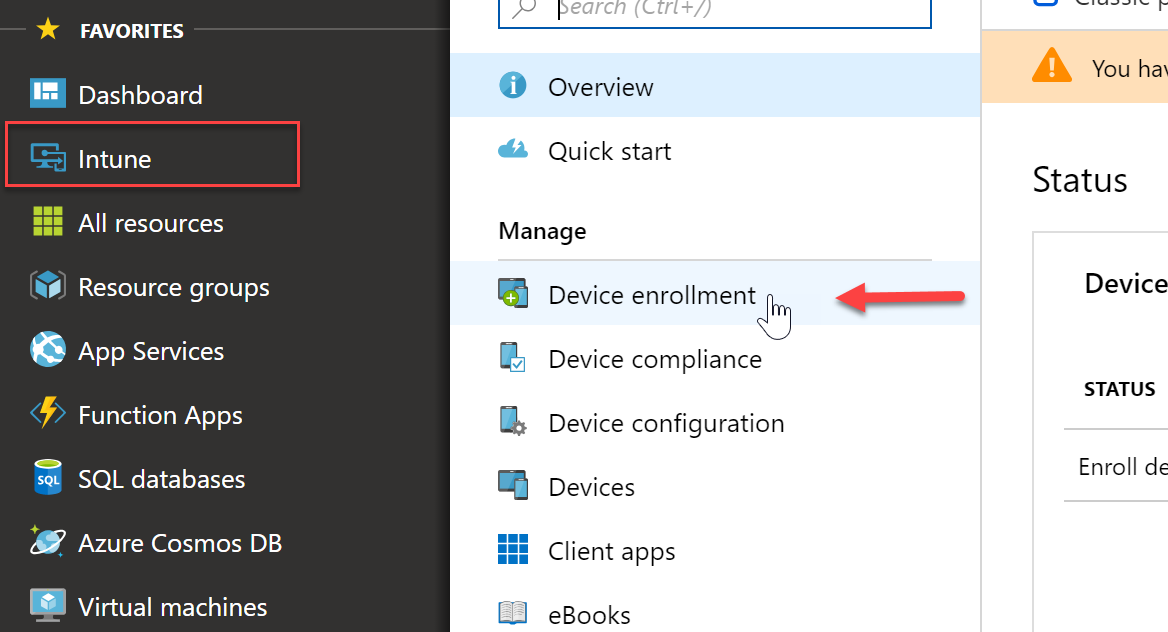
  1. First we must configure Intune as my MDM authority. Since I am doing a stand alone I want Intune as the only authority and not Configuration Manager. By logging into portal.azure.com I can expand the Itune node and select “Device Enrollment”
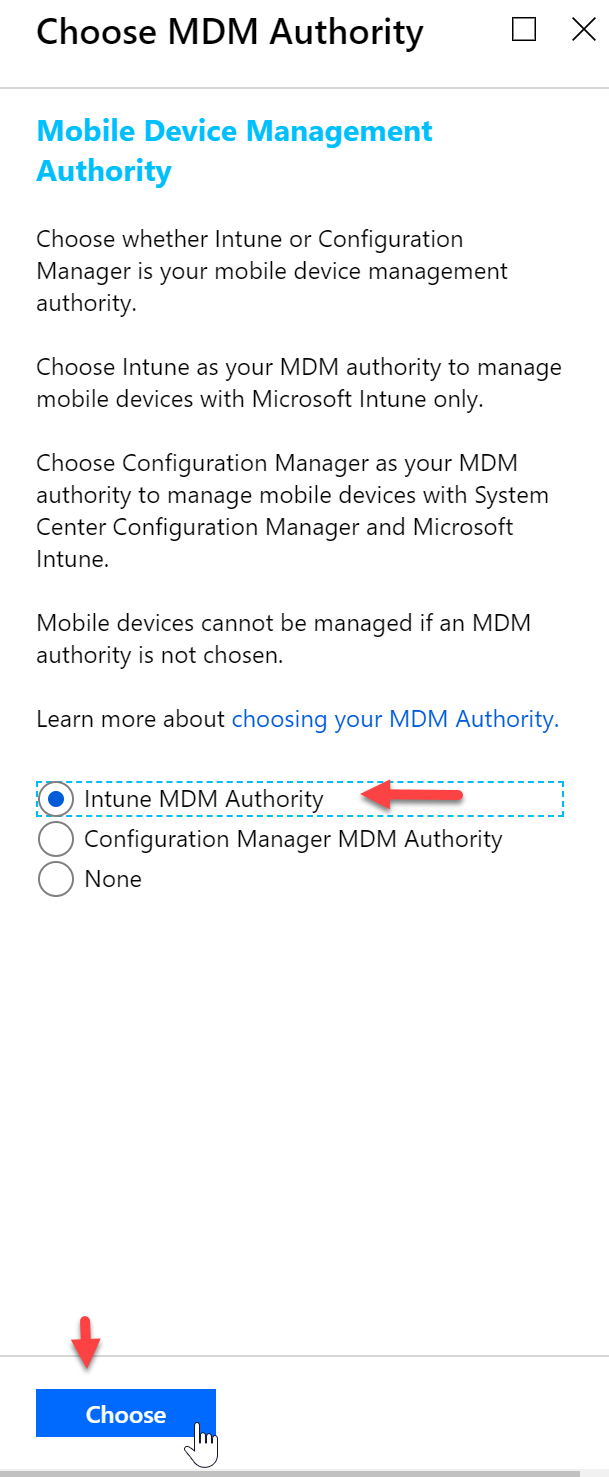
  2. Select  “Intune MDM Authority” and then click “Choose”
  3. I will get a notification that my changes were saved successfully

Configure APN Certificate

To manage iOS devices you must have an Apple Push certificate.

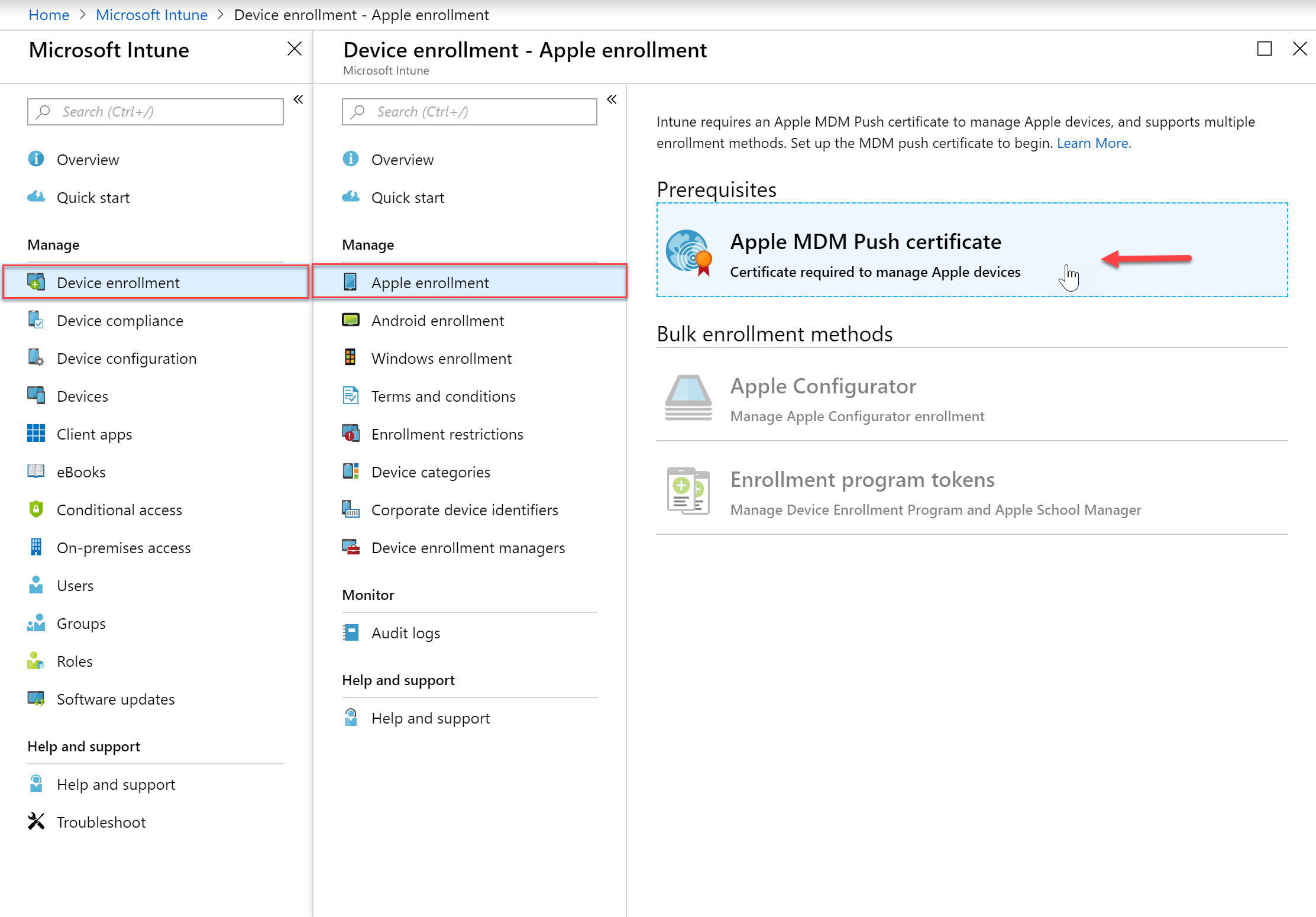
  1. In the Intune blade we want to go to Device Enrollment and then Apple Enrollment and select “Apple MDM Push Certificate”
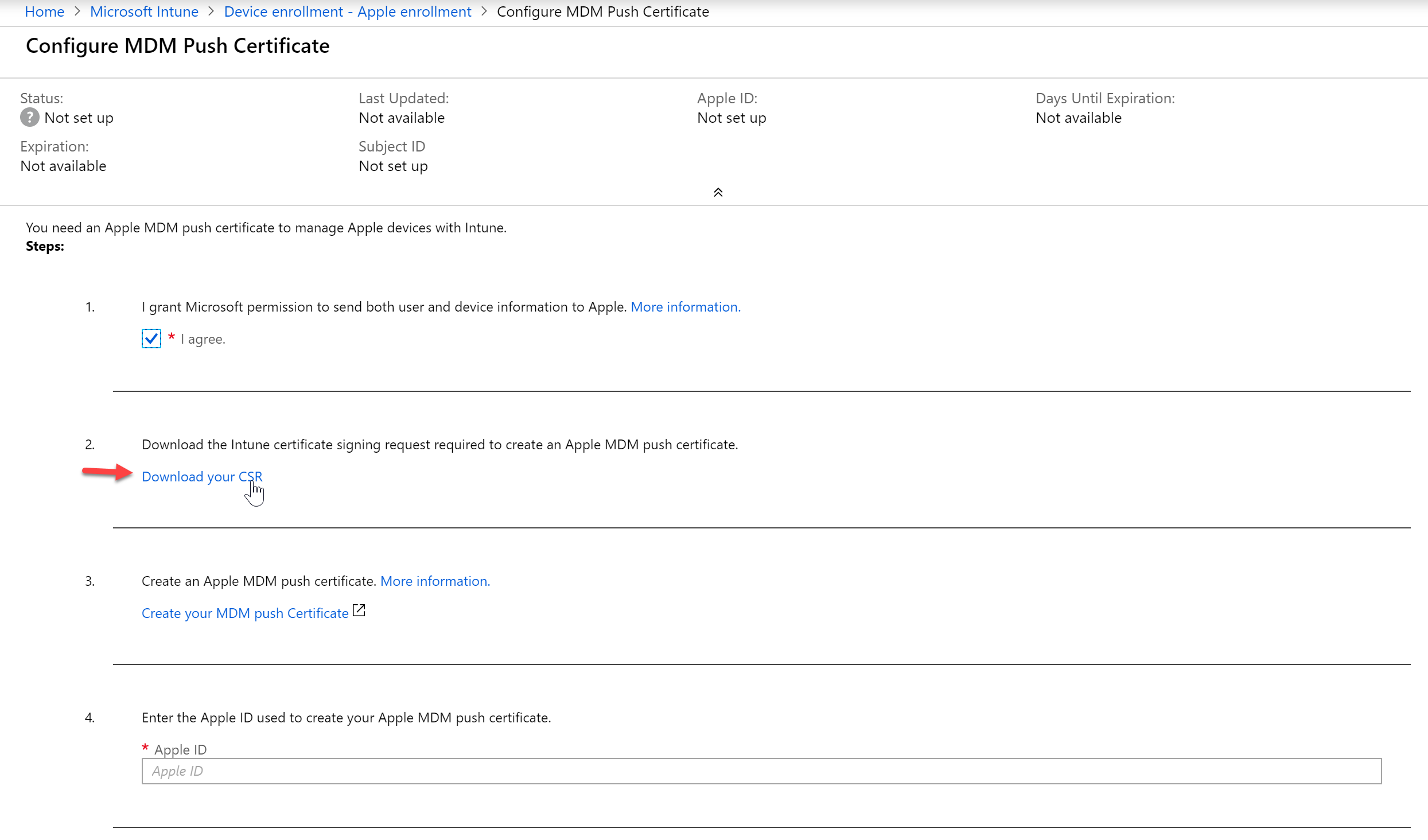
  2. Agree to the terms in step 1 and then download the CSR
  3. It
… Continue...
Customize your Office 365 Encrypted Messages with your Organizations Brand in Office 365

Customize your Office 365 Encrypted Messages with your Organizations Brand in Office 365

October 13, 2018 Brad Wyatt Comments 12 comments

As an Office 365 administrator, you can apply your company branding to customize the look of your organization’s Office 365 Message Encryption email messages as well as the contents of the encryption portal. You can customize the following aspects of the viewing experience for recipients of encrypted email messages:

  • Introductory text of the email that contains the encrypted message
  • Disclaimer text of the email that contains the encrypted message
  • Text that appears in the OME portal
  • Logo that appears in the email message and OME portal
  • Background color in the email message and OME portal

You can also revert back to the default look and feel at any time.

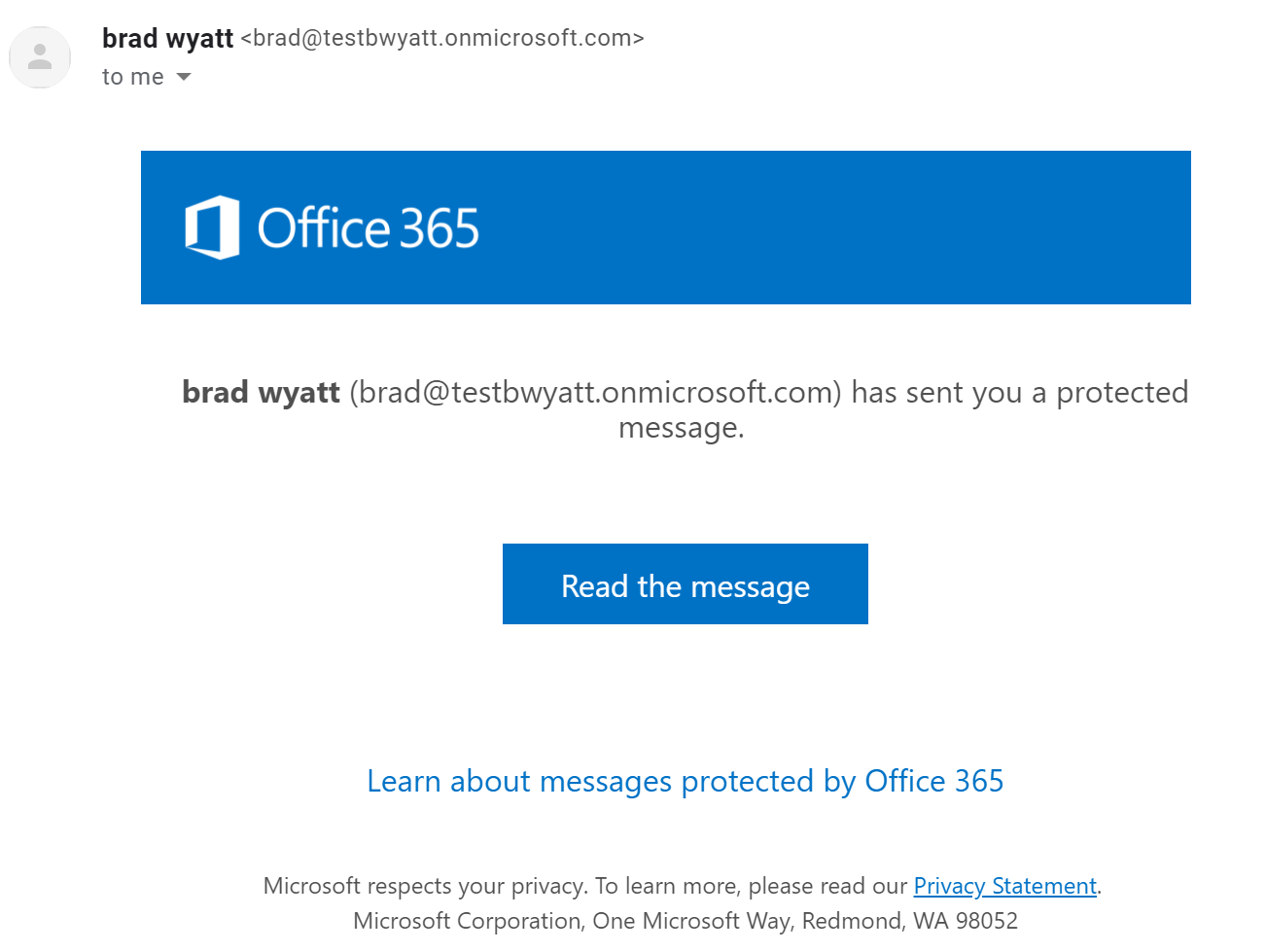
Below is the default message your recipient will see when they receive an encrypted email message.

Customize the Message

To customize the OME message you will first need to connect to Exchange Online using Remote PowerShell. You then want to get … Continue...

Manage and Administer SharePoint using SharePointPnP.PowerShell

Manage and Administer SharePoint using SharePointPnP.PowerShell

August 20, 2018 Brad Wyatt Comments 1 comment

The SharePoint Development Community (also known as the SharePoint PnP community) is an open-source initiative coordinated by SharePoint engineering. This community controls SharePoint development documentation, samples, reusable controls, and other relevant open-source initiatives related to SharePoint development1 .

The SharePointPnP.PowerShell module is quite vast when it comes to managing and administrating your on-premise or SharePoint online environment. Before we dive into it you will first want to install it so you have all the cmdlets available to you.

SharePoint Version Command to install
SharePoint Online Install-Module SharePointPnPPowerShellOnline
SharePoint 2016 Install-Module SharePointPnPPowerShell2016
SharePoint 2013 Install-Module SharePointPnPPowerShell2013

Note: This will be an on-going article. As I continue using this module I will update this article.


Connecting to SharePoint

In my environment I have SharePoint with Office 365 so I will be connecting to SharePoint Online. For testing purposes I will be working in one of my test sites so I will … Continue...

[Tool] Create and Configure Active Directory and Office 365 Users at Once.

[Tool] Create and Configure Active Directory and Office 365 Users at Once.

July 11, 2018 Brad Wyatt Comments 58 comments

One of the things IT Administrators look to automate first is the new user creation process. I recently was going through the process of creating a new hires Active Directory login, Office 365 mailbox, and their Office 365 user account, and I wondered how I could make the process easier and quicker.

My focus was geared towards Managed Service Providers (MSP’s), Human Resource (HR) departments and general Help Desk Technicians. For MSP’s I wanted to create a tool that they could easily use across all of their clients because they may not spend the time to automate new user creations because they have hundreds, if not thousands of clients to tend to, and each client is unique so you can’t just copy the same automation script from one client to another. This would also be a huge asset for Help Desk technicians because they are more often than not the … Continue...

Create an Interactive HTML Report for Office 365 with PowerShell

Create an Interactive HTML Report for Office 365 with PowerShell

June 22, 2018 Brad Wyatt Comments 39 comments

From time to time you may get clients or even managers requesting reports about their Office 365 environment. Another popular reason to compile a report on an Office 365 tenant would be when you take over a new client and you are auditing their environment trying to figure out what exactly is going on.

Click here to view the report as we go through it.

Using the PowerShell module “ReportHTML“, we can create beautiful and interactive HTML reports. Below I will walk you through a report I spent some time creating that includes tabs, charts, data tables and more.  Below you can see the first page of my report. You can navigate to different content by clicking the tab. If you wanted to view the Users report you would just click on that tab.

Report Overview

Dashboard

The Dashboard contains some basic information about the Office 365 tenant … Continue...

Office 365 Report Using Excel COM Interface with PowerShell

Office 365 Report Using Excel COM Interface with PowerShell

April 12, 2018 Brad Wyatt Comments 2 comments

I set out to explore a way to generate a nice, multi-sheet, Office 365 report that I could give to end-user’s or Office Manager’s using PowerShell. Unfortunately, I read about the Excel COM interface before reading about the Excel PowerShell module created by Doug Finke. If you are starting from scratch, I would recommend reading up on the PowerShell Module instead of going the COM route as it’s a easier to use that the Excel COM Interface. Regardless, I finished my PowerShell script and wanted to share it for others to use.

Pre-requisites

Not a lot of pre-reqs for this script and I designed it that way. At first it was reliant on an Excel Workbook that was pre-formatted how I liked, and it would populate the data specifically for that workbook only. However, I decided to have PowerShell format the Excel Workbook from scratch as it ran. So for … Continue...

Create a Real Time Interactive Dashboard for Office 365 Using PowerShell Universal Dashboard

Create a Real Time Interactive Dashboard for Office 365 Using PowerShell Universal Dashboard

April 9, 2018 Brad Wyatt Comments 6 comments

If you have never heard of PowerShell Universal Dashboard you need to head on over to PoshUD right now and check out this awesome PowerShell Module. Using PowerShell Core, Material Design, ReactJS and ASP.NET Core, Universal Dashboard takes advantage of cutting-edge technology to provide cross-platform, cross-device dashboards that looks sleek and modern.1

While reading over some other posts about what other people have done with PowerShell Universal Dashboard, I wondered if there was a way to create a interactive dashboard that would hook into Office 365 and gather data from it. At first, I attempted to create a dashboard that would create a PSSession to Office 365 but it presented some problems and overall was quite slow. I then decided to use the Microsoft Graph REST API to connect to Office 365. This allows it to refresh the data within in the dashboard quickly and takes seconds to connect.… Continue...

Posts navigation

OLDER POSTS
NEWER POSTS

Subscribe

Email


Categories

  • Active Directory (8)
  • AI (3)
  • API (1)
  • AutoPilot (2)
  • Azure (18)
  • Bicep (4)
  • Connectwise (1)
  • Defender for Cloud Apps (1)
  • Delegated Admin (1)
  • DevOps (9)
  • Graph (7)
  • Intune (16)
  • LabTech (1)
  • Microsoft Teams (6)
  • Office 365 (19)
  • Permissions (2)
  • PowerShell (52)
  • Security (1)
  • SharePoint (3)
  • Skype for Business (1)
  • Terraform (1)
  • Uncategorized (2)
  • Yammer (1)

Recent Comments

  • Baru01 APK on Windows LAPS Management, Configuration and Troubleshooting Using Microsoft Intune
  • Jason on Auto Deploy Progressive Web Applications (PWA) using Intune or PowerShell
  • hiwin on The Microsoft Graph Command-Line Interface (CLI)
  • fabio on Set-ADUser: Dealing with Null Values when Importing a CSV; Working with Parameters and Properties that don’t Accept Empty Strings
  • Dominik on Auto Deploy Progressive Web Applications (PWA) using Intune or PowerShell

1,828,037 People Reached

© 2025   All Rights Reserved.